Transforming Your Home Office for Health and Success
*Purchases made through our links may earn us a commission. Please view our disclosure to learn more.
The Silent Saboteur in Your Home Office
If you’ve ever finished a day of remote work feeling like you just went ten rounds in a boxing ring, you aren’t alone. We treat our work desks like permanent fixtures, but the truth is, the desk should be a living, breathing part of your workflow. An ergonomic desk isn’t just a piece of furniture; it is the foundation of your professional endurance. Let’s dive into why this shift is the single most impactful change you can make for your career and your health.
What Exactly Defines an Ergonomic Desk?
When we talk about an ergonomic desk, we aren’t just talking about a sleek slab of wood with fancy legs. We are talking about a tool designed to fit you, rather than forcing you to fit it. It’s an interface between your biological needs and your professional output.
Think of a standard, fixed-height desk like a one-size-fits-all suit. It might fit okay, but it’s probably pulling at the shoulders or dragging at the hem. An ergonomic desk is like a tailor-made garment. It accounts for your height, your limb length, and your unique posture habits. It is essentially furniture that listens to your body.
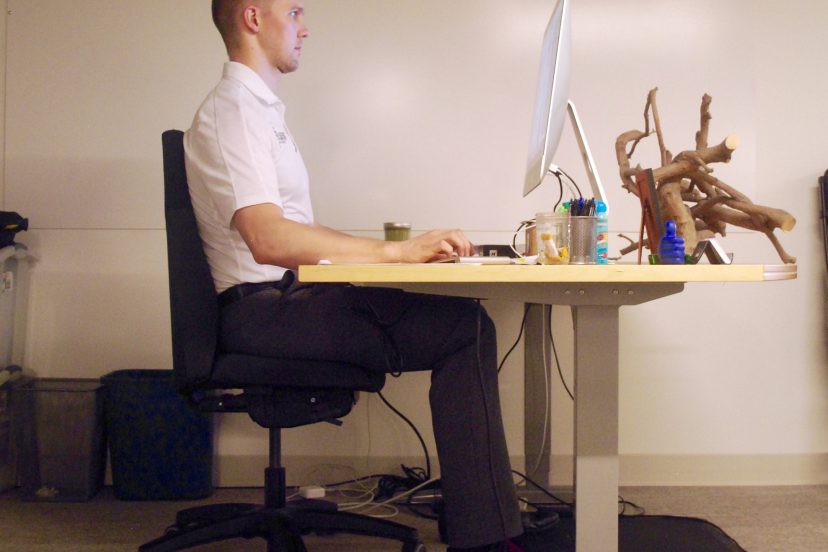
Ergonomics is the science of designing the workplace to fit the worker. An ergonomic desk allows you to achieve the “neutral position.” This is where your feet are flat on the floor, your elbows are at a 90-degree angle, and your wrists are straight. When you achieve this, you are removing the friction—both physical and mental—that keeps you from focusing.
Why Your Current Setup Might Be Failing You: The Hidden Costs of Static Posture
Your chair supports you, but your desk defines how your arms, neck, and shoulders behave. If the desk height is wrong, even the best chair can’t save your posture. Most traditional desks were designed decades ago, long before laptops, dual monitors, and eight-hour screen days became normal. The result? Furniture that simply doesn’t match modern work. A desk that’s too high shrugs your shoulders upward. One that’s too low pulls you forward. Either way, your body spends the day compensating and paying the price.
The Core Benefits: Why I Swear by Mine
1. Unlocking Consistent Comfort and Pain Relief
The most immediate benefit is the reduction of chronic pain. By switching between sitting and standing, you are constantly shifting the pressure points on your body. When I first got my sit-stand desk, my lower back pain didn’t vanish overnight, but over two weeks, it practically evaporated. It’s about movement. Motion is lotion for your joints.
2. Boosting Productivity Through Flow State
Have you ever been in the “zone” and then had to break your concentration because your back started to ache? That is the enemy of productivity. An ergonomic desk removes that physical distraction. When your body is comfortable, your mind is free to focus on the task, not the tension.
3. Energizing Your Body and Mind
Standing up for part of the day increases blood flow and engages your core. It sounds simple, but it is a massive energy booster. If you find yourself hitting that 3:00 PM slump, a quick change to a standing position can provide a natural, chemical-free jolt of energy that caffeine just can’t match.
Top Ergonomic Desks for Your Home Office from $100 to $359
FlexiSpot EN2 Electric Adjustable Standing Desk
A top pick for ergonomic workspaces, this electric standing desk lets you transition smoothly between sitting and standing with a powerful motor and sturdy steel frame. Its spacious desktop and reliable adjustability reduce strain on your back and neck during long workdays, making it easier to maintain good posture. Great for productivity and health.
FlexiSpot Large Dual Motor 4‑Leg Standing Desk
A premium option from FlexiSpot with a solid four-leg frame for extra stability and high load capacity. It offers broader height adjustment, ideal for dual monitors or heavier setups. Perfect if you want a more robust ergonomic investment.
SEDETA 55″ Height Adjustable L‑Shaped Desk
Blending ergonomic adjustability with space efficiency, this L-shaped desk includes plenty of workspace for multitasking. The electric height-adjust feature lets you switch postures throughout the day, supporting better circulation and comfort. Great for corner setups.
Bestier 55″ Lift‑Top L‑Shaped Desk
A more budget-friendly ergonomic option, this sit-to-stand L-shaped desk offers manual height adjustment with plenty of surface space. It includes built-in storage and a monitor stand to help optimize posture and organization.
Tribesigns 70.8″ Executive Office Desk
A classic executive-style workstation with a large surface and robust build. While not electrically adjustable, its spacious design and quality construction make it a solid choice for ergonomic setups when paired with a keyboard tray or monitor arms to improve posture and alignment.
Bestier 55″ L‑Shaped Computer Desk
Another highly rated L-shaped workstation that’s ideal for home offices with limited space. Its thoughtful layout helps keep monitors and accessories at ergonomic viewing angles to support neutral posture.
Fezibo Standing Desk
A budget-minded electric standing desk option that still delivers adjustable height and functionality to support movement and posture changes throughout the day. Good for smaller spaces or starter ergonomic setups.
How to Choose the Perfect Ergonomic Desk for Your Space
Don’t just buy the cheapest option you see. Look for durability. This is a workhorse, not a decoration.
Motorized Adjustability vs. Manual Cranks
I highly recommend a motorized desk. If it’s hard to adjust, you won’t do it. If you have to crank a handle for two minutes every time you want to stand, you will end up leaving it in one position forever. A simple button press removes the barrier to entry.
Stability and Weight Capacity
Test for “wobble”. A desk that shakes when you type is going to drive you crazy. Look for a heavy-duty frame, especially if you use dual monitors or a heavy PC setup.
The Ergonomic Sanctuary: Integrating Your Desk
Once you have the desk, you have to complete the ecosystem. Your desk is only as good as the chair and monitor setup you pair it with. Ensure your monitor is at eye level. If you’re looking down, you’re losing. Use a monitor arm to gain back real estate and keep your neck neutral. Treat your home office like a cockpit; everything should be within reach, and everything should serve your physical well-being.
Conclusion: An Investment in Your Future Self
Making the move to an ergonomic desk is one of the most practical investments you can make. It is not an indulgence; it is a necessity for anyone serious about sustaining a long, healthy, and productive career from home. We spend thousands on laptops and software, yet we often neglect the one thing that actually supports us: our physical workspace. Take control of your environment, listen to your body, and give it the support it deserves. You’ll find that when your body feels good, your work becomes better.
FAQs
- How often should I switch between sitting and standing? I recommend the 20-8-2 rule: Sit for 20 minutes, stand for 8 minutes, and move around for 2 minutes. This keeps your blood flowing without exhausting your legs.
- Will an ergonomic desk really fix my back pain? While it is a massive component, it’s also important to check your chair and monitor height. Ergonomics is a holistic system, not just a desk.
- Are expensive motorized desks worth the extra cost? Yes. The barrier to entry for adjusting your desk is lower with a motor, meaning you are significantly more likely to actually use the standing feature.
- Can I use a regular desk and just add a converter? Absolutely. Desk converters are a great, budget-friendly entry point if you aren’t ready to replace your entire desk yet.
- Is it hard to assemble an ergonomic desk? Most modern ergonomic desks are designed for modular assembly. While it takes an hour or so, the instructions are usually quite intuitive, even for beginners.