Best Workspace Ergonomics: A Comprehensive Guide
*Purchases made through our links may earn us a commission. Please view our disclosure to learn more.
The Ultimate Guide to Best Workspace Ergonomics: Your Body’s Best Friend
If you’ve ever finished a workday feeling like your spine has been replaced by a rusted Slinky, you aren’t alone. I spent years hunched over a laptop, perched on a kitchen chair that was designed for aesthetics rather than anatomy. It wasn’t until a persistent twitch in my shoulder and a dull ache in my lower back became my permanent roommates that I realized something had to change. Ergonomics isn’t just a corporate buzzword; it’s the science of making your environment work for you, rather than forcing your body to adapt to a stiff environment. In this guide, I’m going to walk you through how to transform your workspace into a sanctuary of productivity and physical health
Why Your Back is Screaming: My Personal Ergonomic Epiphany
We often treat our bodies like high-performance sports cars but drive them like we’re stuck in a permanent traffic jam. For the longest time, I thought “ergonomics” meant buying an expensive chair and calling it a day. I was wrong. It’s an ecosystem. When I finally adjusted my monitor height and invested in a footrest, the “brain fog” I attributed to caffeine crashes suddenly evaporated. Why? Because my body wasn’t wasting energy trying to compensate for poor posture. When you sit correctly, your blood flows better, your lungs expand more fully, and your brain gets the oxygen it craves
What exactly are we talking about here? At its core, ergonomics is about “neutral posture.” Imagine a puppet hanging by a string from the crown of its head. Everything is aligned, relaxed, and stacked. In a workspace context, this means your equipment is positioned so that your joints are in their most natural, least stressful positions. Think of it as the “Goldilocks” zone for your musculoskeletal system, not too stretched, not too compressed, but just right
The Foundation: Choosing the Right Chair
Your chair is the most critical piece of equipment in your office. It is the literal foundation of your workday. A bad chair is like a bad pair of shoes; you might not feel the damage in the first mile, but by the tenth, you’re limping. When I look for the best workspace ergonomics, I look for adjustability. If a chair doesn’t let you change the height, tilt, and armrest position, it’s not an office chair, it’s a stool with delusions of grandeur.
(Click here for a list of helpful books on Home Office Ergonomics)
Lumbar Support: The Invisible Spine Saver
Your lower back has a natural inward curve. Most cheap chairs let that curve collapse, leading to the dreaded “C-shape” slouch. High-quality lumbar support fills that gap, maintaining the natural “S” curve of your spine. If your chair lacks this, even a rolled-up towel placed at the small of your back can work wonders. Is it high-tech? No. Does it save your discs from bulging? Absolutely.
The 90-Degree Rule for Hips and Knees
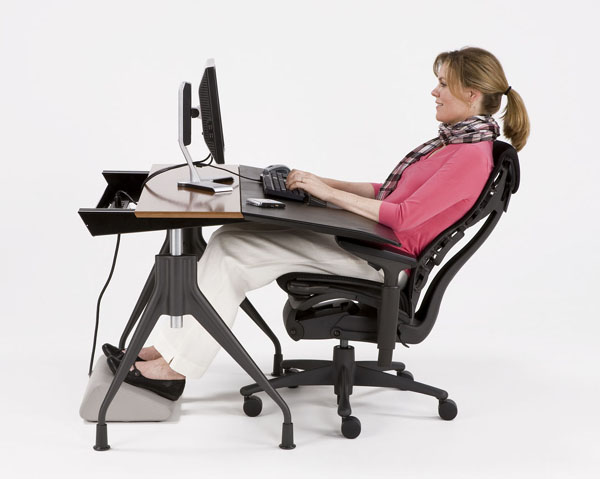
Your feet should never be dangling like you’re sitting on a pier. Your feet should be flat on the floor (or a footrest), with your knees and hips forming 90-degree angles. This distributes your weight evenly across your seat pan. If your chair is too high and your feet don’t reach the floor, you’re putting immense pressure on the undersides of your thighs, which can restrict circulation
Desks: It’s Not Just a Flat Surface
Most people adjust their chair to their desk, but it should be the other way around. Your desk height should allow your elbows to rest at a 90-degree angle while typing, with your shoulders relaxed. If your desk is too high, you’ll end up “shrugging” all day, leading to those nasty tension headaches that feel like a tight band around your forehead.
Standing Desks: Fad or Fundamental?
You’ve heard the phrase “sitting is the new smoking.” While that might be a bit dramatic, prolonged sedentary behavior is definitely a health tax. I transitioned to a sit-stand desk two years ago, and it changed my energy levels. However, standing all day is just as bad as sitting all day. The magic happens in the transition.
Don’t try to stand for eight hours on day one. You’ll end up with sore heels and a grumpy attitude. Start with 20 minutes of standing for every hour of sitting. Use an anti-fatigue mat, it’s like a pillow for your feet. Think of your standing desk like a workout: you need to build up your “desk stamina” slowly.
The Monitor: Saving Your Eyes and Your Neck
Your neck is essentially a pedestal holding up a 10-pound bowling ball (your head). If you tilt that ball forward just an inch or two to look down at a laptop, the effective weight on your neck muscles triples. This is “tech neck,” and it’s a recipe for chronic pain.
The top third of your monitor should be at eye level. This ensures that you are looking slightly downward without tilting your chin. If you use a laptop, please, for the sake of your neck, get a laptop stand and an external keyboard. Propping your laptop up on a stack of books is a classic “pro-tip” that costs zero dollars but yields high dividends in comfort.
Input Devices: Mastering the Mouse and Keyboard
Your keyboard and mouse should be close enough that you don’t have to reach for them. Reaching strains the rotator cuff. Your wrists should be straight, not tilted up, down, or sideways.
Neutral Wrist Positioning: Preventing the “Tingle”
Carpal Tunnel Syndrome is the bogeyman of the office world. To avoid it, imagine you are playing the piano. Your wrists should float slightly or rest on a soft pad, but never be bent at sharp angles. I switched to a vertical mouse recently, and while it looks like a shark fin, it keeps my forearm in a “handshake” position, which is far more natural than the palm-down “twist” of a standard mouse.
Environmental Ergonomics: Lighting and Atmosphere
Ergonomics isn’t just physical; it’s sensory. Glare on your screen causes you to squint and lean forward, breaking your perfect posture. Position your monitor perpendicular to windows to avoid reflections. Furthermore, consider the “color temperature” of your room. Warm light is great for relaxing, but cool, blue-toned light keeps you alert.
The Human Factor: Movement and Micro-breaks
The best posture is your next posture. Even the most expensive ergonomic setup in the world won’t save you if you remain static for hours. Our bodies were designed to move, gather, and hunt, not to be statues in front of a glowing rectangle.
To keep your eyes from fatiguing, every 20 minutes, look at something 20 feet away for at least 20 seconds. It gives your eye muscles a chance to relax. I also like to incorporate “micro-stretches”; reaching for the ceiling or doing a few seated cat-cow stretches every time I finish an email.
Pros and Cons of Investing in Ergonomics
Pros of Proper Workspace Ergonomics:
- Skyrocketing Productivity: When you aren’t distracted by a nagging pain in your hip, you can actually enter a “flow state” and get your work done faster.”
- Long-Term Health Savings: It’s much cheaper to buy a $500 chair today than to pay for physical therapy or spinal surgery ten years from now.
- Improved Mood and Energy: Better posture leads to better breathing, which keeps your cortisol levels in check and your energy consistent throughout the day.
Cons of Neglecting Ergonomics:
- Chronic Repetitive Strain Injuries (RSIs): Neglect leads to permanent damage like tendonitis or carpal tunnel that can make even basic tasks painful.
- Decreased Mental Clarity: Poor circulation and physical discomfort are massive “energy leaks” that lead to burnout and fatigue by 2:00 PM.
- Permanent Postural Deformities: Years of “the slouch” can lead to a rounded upper back (kyphosis) that is difficult and painful to reverse later in life.
Conclusion: Your Future Self Will Thank You
Optimizing your workspace is an act of self-love. It’s an acknowledgement that your health is the engine that drives your career and your life. You don’t have to spend thousands of dollars overnight. Start small: raise your monitor, check your chair height, and remember to breathe. Your body is a finely tuned instrument; don’t let it go out of tune because of a poorly placed mouse. Why wait for the pain to become unbearable? Take ten minutes today to audit your setup. Your future self, the one without the backaches and the wrist splints, will look back and thank you for the effort.
FAQs (Frequently Asked Questions)
Is a gym ball a good substitute for an office chair?
While it’s great for core engagement, a gym ball lacks back support and can actually lead to fatigue if used for a full 8-hour shift. It’s better used as a “break chair” for 30 minutes a day rather than a permanent replacement.
How do I know if my monitor is at the right distance?
A good rule of thumb is “arm’s length.” Sit back in your chair and extend your arm; your fingertips should just barely touch the screen. If it’s further, you’ll strain your eyes; if it’s closer, you might experience more intense blue light fatigue.
Can I use a laptop on the couch if I have a lap desk?
Occasionally, yes. But the couch is the enemy of ergonomics because it encourages a “slumped” spine. If you must work from the couch, use a lap desk to raise the screen and place a firm pillow behind your lower back.
Does the type of flooring matter for my ergonomic setup?
Indirectly, yes! If you have a hard floor, your chair might roll too easily, causing you to tense your legs to stay still. If you have thick carpet, the chair won’t move at all, making it hard to get in and out. A medium-pile rug or a dedicated chair mat provides the perfect amount of resistance.
What is the single most important ergonomic change I can make on a budget?
Raise your monitor to eye level. Whether you use a dedicated stand or a stack of old textbooks, getting your head into a neutral position is the “highest ROI” change you can make for immediate pain relief.